Download program Truck Simulator Launcher v1.0.3.0 (1.46.x) for ETS2 | Euro Truck Simulator 2 game.
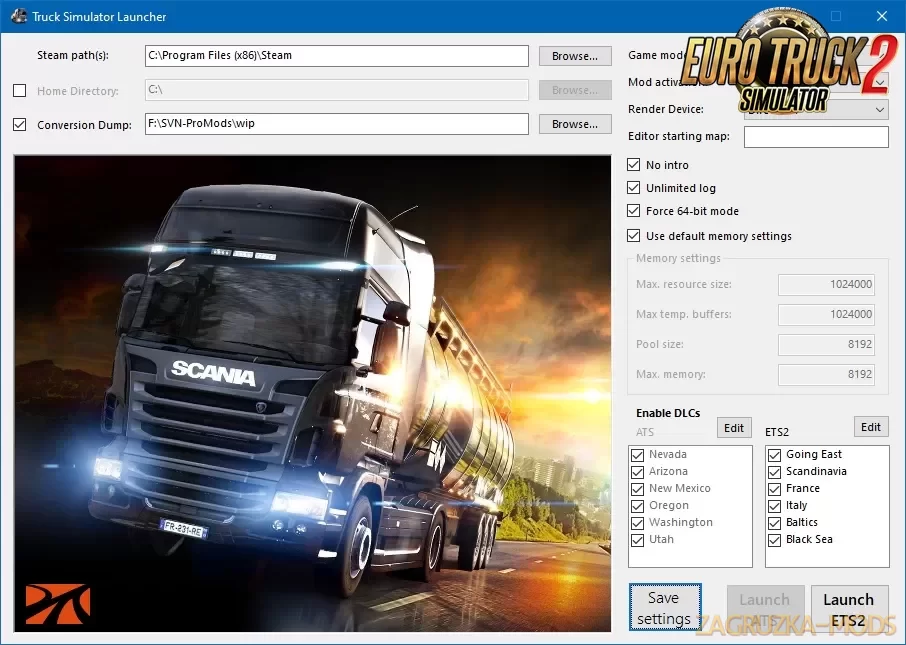
Truck Simulator Launcher is a tool that sends start-up parameters to Steam. The parameters can be changed in an intuitive, visual way. We have experimented and refine the launcher within the ProMods team to see if it works, but now I want to release it to a bigger audience. Since 1.36, it's not possible anymore to launch the map editor from the game, and you have to launch it with command line codes. Now this is quite a hassle for people to switch between different game modes. So, I made a tool that helps you to do just that, and much more!
Features Truck Simulator Launcher:
- Change your home directory
- Define the location where it needs to dump automatically converted files
- Change the game mode (game, editor, item validation mode)
- Change the rendering device (DirectX 11 or OpenGL)
- Define which map module the editor starts in
- Enable or disable mods
- Enable or disable DLCs
- Enable or disable the intro animation
- Enable or disable unlimited logs
- Force 64-bit mode
- Change memory management options
Changes in v1.0.3.0 (2021-03-21):
- Added option to ignore loading the "user_map" folder when loading the map editor. Useful when your map's source files are on a different location (like team projects).
- Added option to force mods without loading workshop mods: "Force Mods (Local only).
- Added Map Sound Editor game mode option, since SCS separated sound editing from the map editing.

Tested on game version 1.46.x