Download Simulator Mods » Euro Truck Simulator 2 » ETS 2 other mods » Enhanced OBC for K100-E v1.0.1 for Ets2

Enhanced OBC for K100-E v1.0.1 for Ets2

27-11-2019, 11:00 1 031 0 Comments
Community Rating
0
Enhanced OBC for K100-E v1.0.1 for Ets2 Available
Mod InformationCore details, compatibility and publication data
CategoryETS 2 other mods
Game Version1.35.x,1.36.x
CreditsEddie Yantz, Overfloater
Mod ID18080
Comments0
Published27-11-2019, 11:00
About this Mod
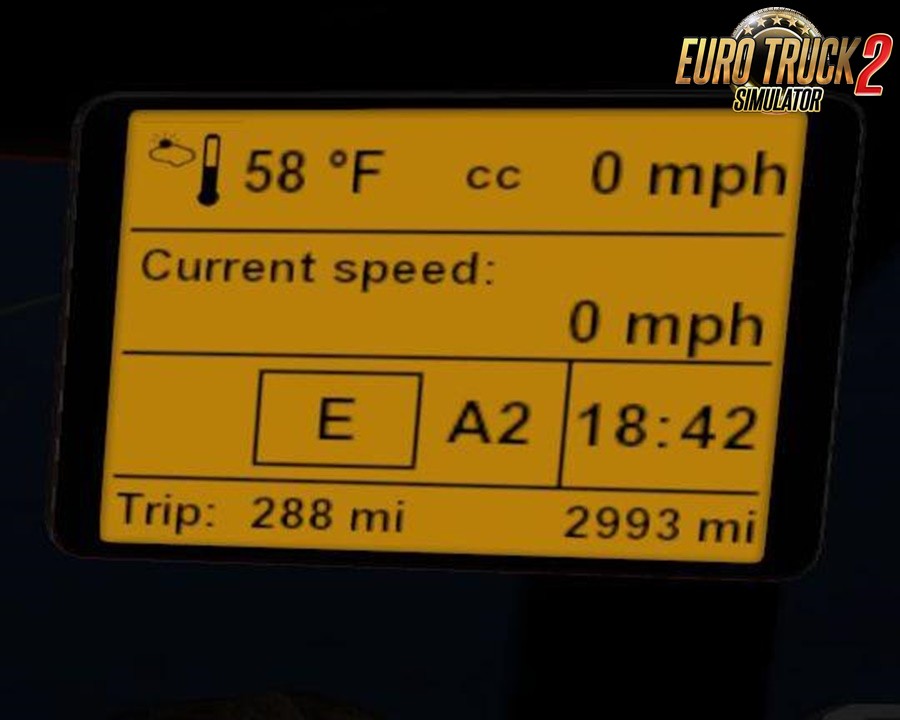
Enhanced OBC for K100-E v1.0.1 for ETS2 | Euro Truck Simulator 2 game. 

Features:
“Aftermarket” OBC display adds following to the stock display:
– always visible cruise-control setting
– trip distance
– Alpha, 8-pt compass
– instananeous fuel consumption
– current speed

Tested on 1.35.x-1.36 beta game version

Enhanced OBC for K100-E v1.0.1 for Ets2 Enhanced OBC for K100-E v1.0.1 for Ets2
Mod ID18080
CategoryETS 2 other mods
Game Version1.35.x,1.36.x
CreditsEddie Yantz, Overfloater
Community Rating0
Views1 031
Comments0
Favorites

About this download

Enhanced OBC for K100-E v1.0.1 for Ets2 is listed in the ETS 2 other mods section for players looking for a clearly documented mod download. Before downloading, compare the compatible game version with your installation and review the credits and available mirrors.

This area separates useful mod information from the download controls, making the page easier to scan and leaving clear space for advertising without mixing ads with the download buttons.

Before downloading: check the game version, credits and available mirrors.
GET FILE NOWDirect Access
Download links may redirect to trusted third-party mod hosting platforms. We are not responsible for advertisements or additional content displayed there. If a link is broken or incorrect, please contact us.
Related ModsSimilar Mods to try
TELEMETRY DASHBOARD FOR SCANIA G & R & T V0.8 1.27
TELEMETRY DASHBOARD FOR SCANIA G & R & T V0.8
ETS 2 other mods
INSTALLATION: • Extract the contents of the RAR archive. LEAVE THE “SCANIA G-R-T” FOLDER INTACT. • Move the “Scania G-R-T” Folder to the Skins folder of the Telemetry Server (located at...
Community Rules
Keep it respectful — no insults or personal attacks
Stay on topic — comments must relate to the mod/post above
No spam, advertising or self-promotion links
No duplicate comments or copy-paste flooding
Report broken links using the Report button, not comments
Comments in violation will be removed without notice